# Scene Properties
When nothing is selected on the canvas, the Property Panel shows **Scene Properties**. These settings define the global structure of your animation—its dimensions, timing, and visual baseline.
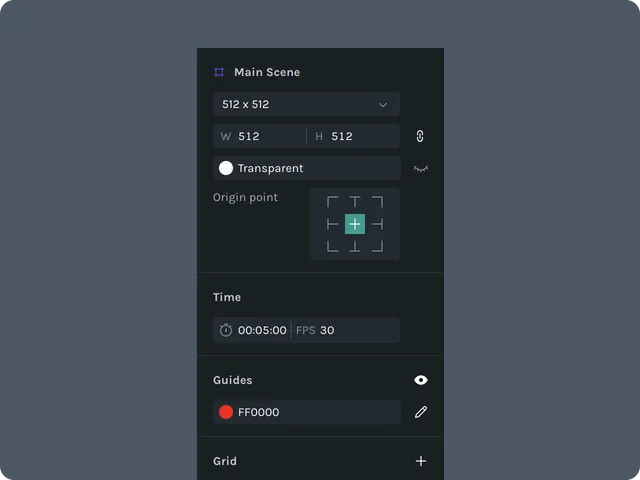 ## Scene Size
Controls the width and height of the entire scene:
## Scene Size
Controls the width and height of the entire scene:
**Width** (px)
**Height** (px)
Changing these values updates the scene bounds and affects layout for all layers.
## Background Color
Sets the **scene background**, visible in the editor and included in exports unless exported with transparency.
Choose via color picker
Enter HEX, RGB, or HSL
Opacity supported
If you need transparency, set **background to Transparent**.
## Duration & FPS
### **Duration**
Total animation length.
Specify in **seconds** or **frames**
Changing duration expands or trims the timeline
### **FPS (Frames Per Second)**
Controls smoothness and keyframe timing.
Common values:
**30 FPS** (default)
**60 FPS** (high performance animations)
**24 FPS** (cinematic/illustrative)
## Bounding Box Behavior (Scene-Level)
Controls how snapping, alignment, and distribution tools interpret your scene bounds.
Scene bounding box always equals **scene size**
Alignment tools use scene bounds when multiple layers are selected
Does not change based on content inside the scene