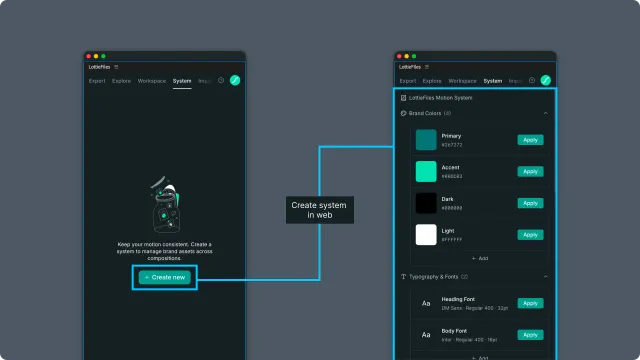
Motion System 기본
Motion System의 system, section, item이 무엇인지와 draft 및 발행 방식이 전체 워크플로에서 어떻게 작동하는지 알아봅니다.
Motion system은 item의 모음
motion system은 모션 디자인에 특화된 design element를 담는 이름 있는 컨테이너입니다. 시간 기반 속성을 위한 Figma library라고 생각하면 됩니다.
Motion system은 sections를 포함합니다. 각 section은 item의 typed group입니다.
Section types
플러그인은 다섯 가지 section type을 지원합니다.
| Section type | 저장하는 것 | Example items |
| Colors | 이름 있는 브랜드 또는 모션 전용 색상 | brand-primary, accent-warning, bg-surface |
| Easings | 이름 있는 easing curve | ease-in-out-soft, bounce-strong, spring-quick |
| Fonts | Font reference | display-bold, body-regular |
| Motion Presets | 미리 만든 motion pattern | fade-in-up, scale-pulse, slide-from-right |
| 에셋 | 에셋 reference(아이콘 세트, 일러스트 등) | success-icons, loading-states |
Draft and Published
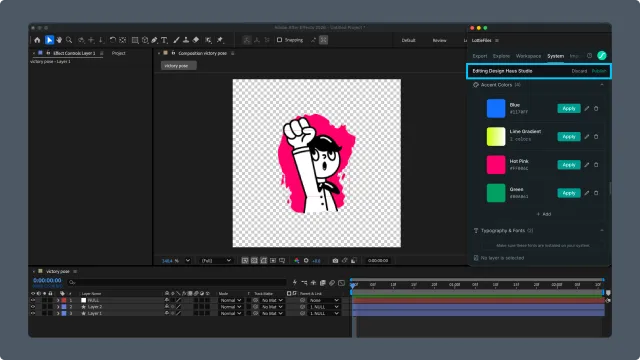
시스템 편집은 draft 버전에서 이루어집니다. draft가 열린 동안 패널 헤더에는 **Editing *{system name}***와 Discard, Publish 액션이 표시됩니다. Publish는 draft를 live 버전으로 만들고, Discard는 draft를 버립니다. 내용이 없는 system은 publish할 수 없습니다.
Motion System이 워크플로에 들어가는 방식
일반적인 흐름:
시스템 생성 — Create new를 선택해 Motion System 웹 대시보드를 엽니다. Motion System 생성과 시스템 자체 관리는 웹에서 진행합니다.
아이템 추가 또는 수정 — AE 플러그인에서 기존 시스템을 열고 지원되는 컬러, 이징, 폰트, 컬렉션 에셋을 추가하거나 수정합니다. 모션 프리셋을 더 자세히 편집해야 할 때는 Lottie Creator를 사용합니다.
발행 및 적용 — draft를 발행하고 AE 컴포지션에서 레이어나 속성을 선택한 뒤 필요한 시스템 아이템을 적용합니다.