Parenting
Parenting creates hierarchical relationships between layers, allowing child layers to inherit transform properties from parent layers. Essential for coordinated motion and complex character animation.
What is parenting?
Parenting links a child layer to a parent layer so the child inherits the parent's transform properties.
Transform inheritance:
- •Child moves when parent moves
- •Child rotates around parent's anchor point
- •Child scales with parent's scale
- •Child's transforms are relative to parent
Setting up parenting
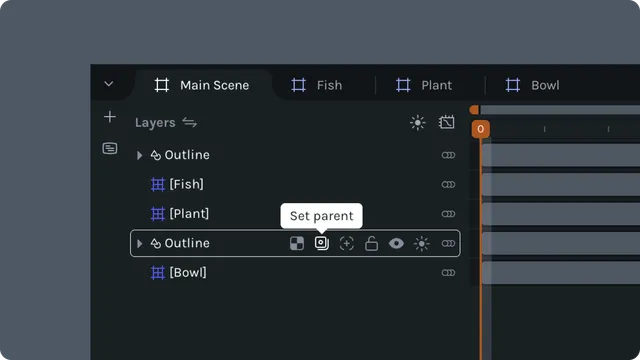
Using parent dropdown:
Select child layer
Find parent icon/dropdown in layer row
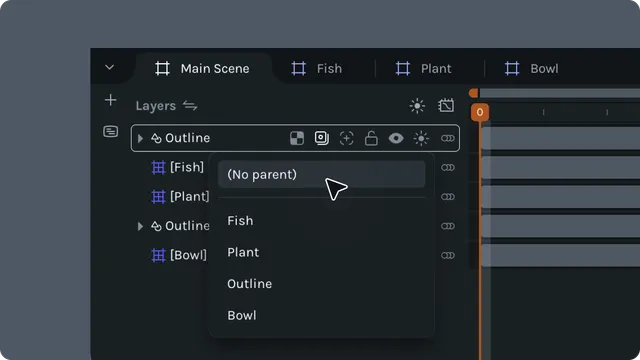
Click to open parent selection dropdown
Choose parent layer from list
Child is now parented to selected layer
Layers that cannot be parents:
- •Track matte layers (hidden matte layers)
- •Layers that would create circular dependency
Transform inheritance
Position: Child position is relative to parent position. Final position = Parent position + Child position.
Scale and Skew: Child scale and skew are multiplicative with parents'.
Anchor point: Child rotates around parent's anchor point. Critical for proper hierarchical motion.
Unparenting layers
Removing parent:
Select child layer
Open parent dropdown
Select "(No parent)" option
Layer becomes independent
Effect:
- •Child no longer inherits parent transforms
- •Child maintains current world position
- •Local transforms become absolute
Multi-level hierarchies
Create complex hierarchies with nested parenting.
Example hierarchy:
Body (root)
└── Arm
    └── Forearm
        └── Hand
            └── Fingers
Transform flow:
- •Rotate Body → Entire arm rotates
- •Rotate Arm → Forearm, hand, fingers rotate
- •Rotate Forearm → Hand and fingers rotate
- •Rotate Hand → Only fingers rotate