Scene Properties
When nothing is selected on the canvas, the Property Panel shows Scene Properties. These settings define the global structure of your animation—its dimensions, timing, and visual baseline.
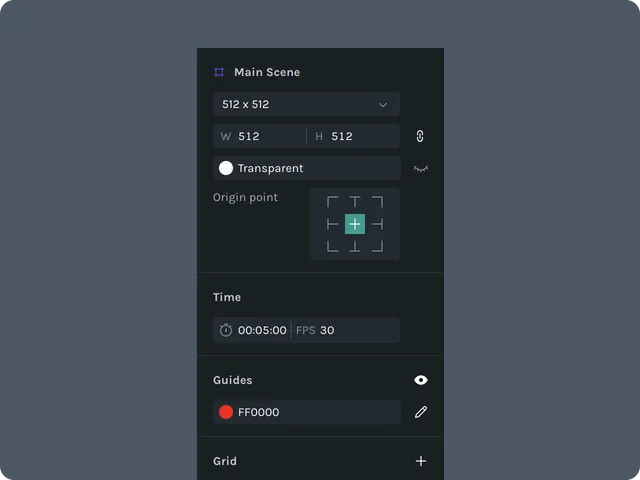
Scene Size
Controls the width and height of the entire scene:
- •Width (px)
- •Height (px)
Changing these values updates the scene bounds and affects layout for all layers.
Background Color
Sets the scene background, visible in the editor and included in exports unless exported with transparency.
- •Choose via color picker
- •Enter HEX, RGB, or HSL
- •Opacity supported
If you need transparency, set background to Transparent.
Duration & FPS
Duration
Total animation length.
- •Specify in seconds or frames
- •Changing duration expands or trims the timeline
FPS (Frames Per Second)
Controls smoothness and keyframe timing.
Common values:
- •30 FPS (default)
- •60 FPS (high performance animations)
- •24 FPS (cinematic/illustrative)
Bounding Box Behavior (Scene-Level)
Controls how snapping, alignment, and distribution tools interpret your scene bounds.
- •Scene bounding box always equals scene size
- •Alignment tools use scene bounds when multiple layers are selected
- •Does not change based on content inside the scene
Last updated: October 8, 2026 at 10:45 AMEdit this page