Duplicator
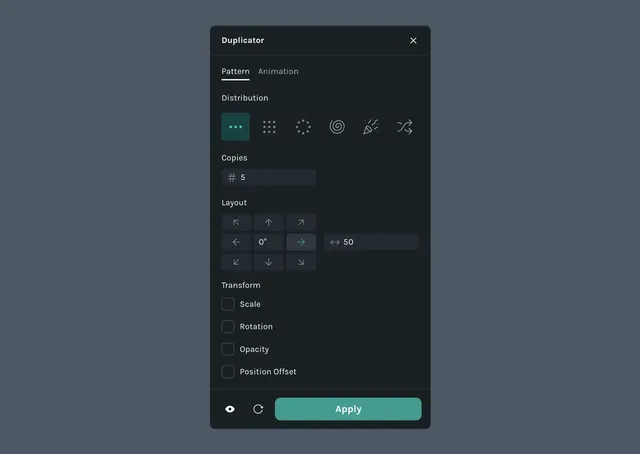
The Duplicator plugin creates multiple copies of a layer, shape, group, or path and arranges them in patterns using offsets for position, rotation, scale, and opacity.
What it helps you do
- •Generate repeating patterns without duplicating layers by hand
- •Create radial arrangements like flower petals, clock ticks, or loading indicators
- •Scatter copies across an area for confetti, particles, or organic layouts
How it works
Select a layer, shape, group, or path on the canvas
Click the Duplicator icon in the left sidebar
Choose a pattern type
Set the number of copies and configure the pattern-specific settings
Adjust transform offsets to vary scale, rotation, opacity, and position across copies
Click Apply to generate the duplicates
Pattern types
The Advanced Duplicator supports six pattern types. Each pattern has its own settings, plus a shared set of transform offsets applied across copies.
Linear
Arrange copies along a straight line.
- •Copies — number of duplicates to generate
- •Layout — direction of the line
- •Degree — angle of the line
- •Spacing — distance between each copy
Grid
Arrange copies in a grid of rows and columns.
- •Copies — number of duplicates to generate
- •Offset — horizontal and vertical spacing between copies
- •Stagger alternate rows — shift every other row for a brick-style layout
Circular
Arrange copies around a circle.
- •Copies — number of duplicates to generate
- •Radius — distance from the center to each copy
- •Start angle and End angle — range of the arc
- •Orient copies along circular path — rotate each copy to follow the curve
- •Presets — full circle, semicircle, or quarter circle
Spiral
Arrange copies along a spiral path.
- •Copies — number of duplicates to generate
- •Start radius and End radius — inner and outer radius of the spiral
- •Revolutions — number of times the spiral wraps around the center
- •Growth rate — how the radius expands between revolutions (linear or exponential)
- •Orient copies along spiral path — rotate each copy to follow the curve
Confetti
Scatter copies across an area for a burst or spray effect.
- •Copies — number of duplicates to generate
- •Spread area — size of the region copies are scattered across
- •Seed — reshuffles the scatter while keeping the same settings
Random
Distribute copies randomly inside a defined boundary.
- •Copies — number of duplicates to generate
- •Boundary shape — rectangle or circle
- •Boundary size — width and height of the boundary
- •Minimum distance — smallest allowed gap between copies
- •Seed — reshuffles the random placement while keeping the same settings
Transform offsets
These offsets are available for every pattern and control how each copy varies from the previous one.
- •Scale — incremental scaling applied to each copy
- •Rotation — rotation offset applied to each successive copy
- •Opacity — opacity offset applied to each successive copy
- •Position offset — X and Y offset added on top of the pattern's placement