Physics Simulator
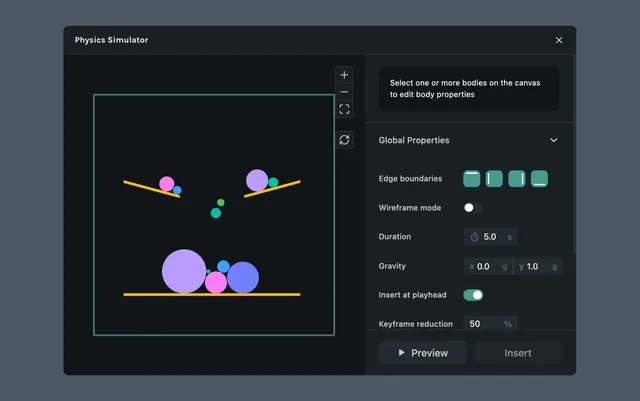
Physics Simulator applies real-world physics to your layers — gravity, bounce, friction, and collisions — and generates the keyframes for you. Use it to create realistic motion without manually tweaking curves.
What it helps you do
- •Generate natural fall, bounce, and collision motion automatically
- •Skip hours of manual keyframing for physics-based animations
- •Produce editable keyframes you can refine in the timeline
How it works
Open the Physics Simulator plugin from the left sidebar
Configure global properties for the simulation (gravity, duration, boundaries)
Select one or more bodies on the canvas to edit their body properties (mass, friction, bounciness)
Run the simulation to preview the motion
Insert the result at the playhead to generate keyframes on the selected bodies
Global properties
Global properties apply to the entire simulation.
- •Edge boundaries — confine bodies inside the canvas frame so they collide with the edges
- •
Wireframe mode — render bodies as outlines while previewing, to make the simulation easier to read
- •Duration — length of the simulation
- •
Gravity (x-g, y-g) — direction and strength of gravitational pull on the horizontal and vertical axes
- •Insert at playhead — place the generated keyframes starting at the current playhead position
- •Keyframe reduction — simplify the output by removing redundant keyframes
Body properties
Select one or more bodies on the canvas to edit their individual properties.
- •Mass — how heavy the body is; affects how it reacts to forces and collisions
- •Initial force — starting push applied to the body when the simulation begins
- •Friction — resistance when the body slides against another surface
- •Air friction — resistance from the air that slows motion over time
- •
Bounciness — how much energy is preserved when the body collides with another body or boundary
- •Destroy on collision — remove the body from the simulation when it collides with another
Example use cases
- •A ball that falls, bounces, and settles on the floor
- •Confetti or particles scattering across the scene
- •Objects tumbling against obstacles with realistic deflection
- •Stacked elements collapsing under gravity