Spring Curve
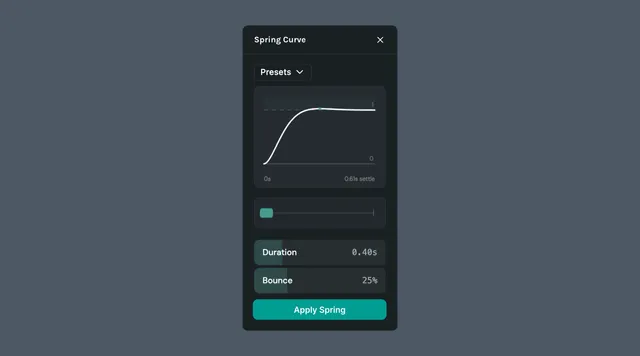
Spring Curve replaces standard linear or bezier easing with physics-based spring motion. Tune duration and bounce to create animations that feel natural and responsive.
What it helps you do
- •Create organic, bouncy easing without manually shaping bezier curves
- •Make UI micro-interactions like buttons, toggles, and modals feel alive
- •Dial in the exact behavior — snappy and tight or loose and overshooting
How it works
Select a keyframe or animated property in the timeline
Open the Spring Curve plugin from the left sidebar
Adjust duration and bounce until the preview matches the motion you want
Apply the curve to replace the existing easing
Parameters
- •Duration — how long the animation takes to settle into its final position
- •
Bounce — how much the spring overshoots and oscillates before resting; higher values produce more bounce
Presets
Start from a preset and tweak from there, or apply one as-is.
- •Smooth — gentle, even motion with no overshoot
- •Snappy — quick to settle with a slight tactile finish
- •Bouncy — pronounced overshoot that rebounds before resting
- •Elastic — stretchy motion with multiple oscillations
- •Jello — wobbly, jiggly settle reminiscent of soft material
- •Pop — fast burst into place with a small kick at the end
- •Gentle — soft, slow easing for subtle transitions
- •Swift — fast, direct motion with minimal bounce
- •Heavy — slow, weighty motion as if moving a dense object
- •Overshoot — passes the target before easing back into position
- •Wobble — loose oscillation around the target before settling
- •Crisp — tight, controlled motion that locks in cleanly
- •Fluid — flowing, continuous motion with natural follow-through
Last updated: October 8, 2026 at 10:45 AMEdit this page