How to Export
Export animations from Lottie Creator to your LottieFiles workspace, then download them in the formats you need or deliver them via CDN.
Export to Workspace
Exporting happens in two steps: first you save the animation to a workspace, then you choose what to download.
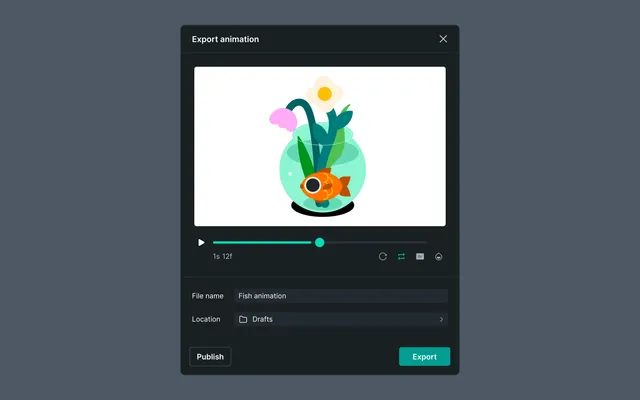
How to export and use your animations:
Step 1 — Set up the export
Click Export in Lottie Creator to open the export window, where you can:
- •Name the file — set the file name for your animation
- •Choose a location — select which workspace to save it to
- •Preview — review the animation before exporting
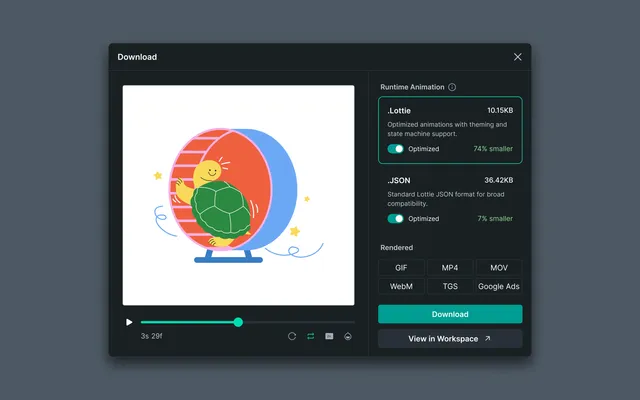
Step 2 — Download or open in workspace
Click Export to save the animation, then:
- •
Select file types — choose the formats you want and download them directly from Lottie Creator
- •Open in workspace — jump straight to the animation in your LottieFiles Workspace
Exports are private by default and stored in your workspace.
CDN and Embed Delivery
LottieFiles provides CDN hosting for delivering animations without downloading files.
What CDN Offers
From the Handoff tab, you can enable:
- •Hosted Asset URLs - CDN links for your animations
- •Format choice - JSON or dotLottie hosted
- •Version selection - Latest or pinned version
- •Embed code - HTML, React, iOS, Android, Web Components, and more
Why Use CDN
- •Automatic updates across all platforms
- •No manual export hassle
- •Optimized delivery with caching and version control
- •Direct integration into projects
Multi-Animation Export
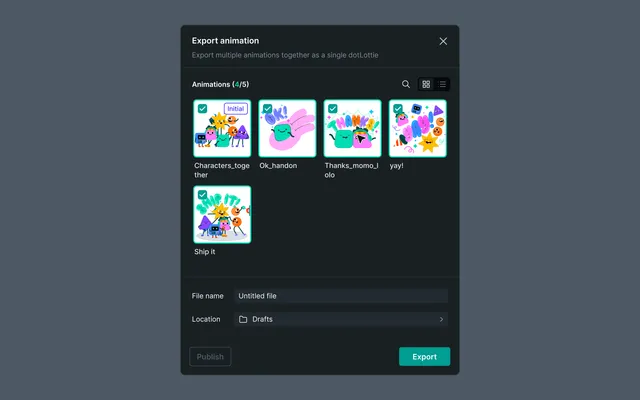
Multi-Animation lets you manage and export multiple animations from a single project — no more juggling separate files. Everything lives inside one .lottie file, keeping scenes modular, dependencies clean, and handoffs simple.
Why use it
- •
For designers — all related animations (idle, loading, success) live in one project, sharing the same assets, colors, and motion settings. Update a shared asset once and it updates everywhere.
- •
For developers — a single
.lottiefile can contain multiple named animations, so they can reference each state in code without managing separate files per component. - •
For teams — one file per component or motion system instead of dozens of individual files to version, name, and hand off.
Export flows
Single scene
Behavior is unchanged. Click Export → Location Selector → done.
Multi-scene export
Click Export — a dropdown appears listing all top-level scenes (nested scenes are excluded)
All scenes are selected by default
Customize your selection, then click Continue
Location Selector opens → multiple animations are exported to Workflow
If no scenes are selected, the Continue button is disabled with a tooltip: "You need to select at least one scene to export."
Nested scenes
Nested scenes behave like independent animations. Exporting a nested scene doesn't pull in the parent — clean separation, no surprises.
Set initial scene
The first scene in the list is the default initial scene — the cover animation shown in Workflow.
- •Hover over any other scene to reveal a Set as initial button
- •Clicking it promotes that scene to the cover without reordering the list
- •
The button only appears on selected (checked) scenes — unselected scenes won't be exported, so they can't be set as initial
Workspace Management
Your workspace lets you:
- •View and search animations
- •Edit titles, descriptions, and tags
- •Change themes or colors
- •Organize using available collections
- •Share via links or workspace access
- •Delete files when no longer needed