Motion Tokens
Motion Tokens let you control any animation property - text, colors, transforms, and layouts — from code at runtime. One file, infinite variations.
This could include updating text to match the score of a game, the position of a layer to handle drag-and-drop, or changing scale to display the progress of a loading bar.
Under the hood, Motion Tokens use the Slots API in dotLottie. Developers use this API to connect tokenized properties to live data.
What Can Be Tokenized?
Motion Tokens expand what used to be "slots" to include more powerful properties:
- •Text — content, font, size, and alignment
- •Colors — solid colors
- •Gradients — multi-stop gradient control
- •Position — X and Y coordinates
- •Scale — vertical and horizontal
- •Rotation — 0–360 degrees
- •Opacity — transparency values
- •Skew / Skew Axis
In Creator
Motion Tokens begin their life in LottieFiles Creator. They can be accessed through a dropdown chevron button that appears next to each property when hovered.
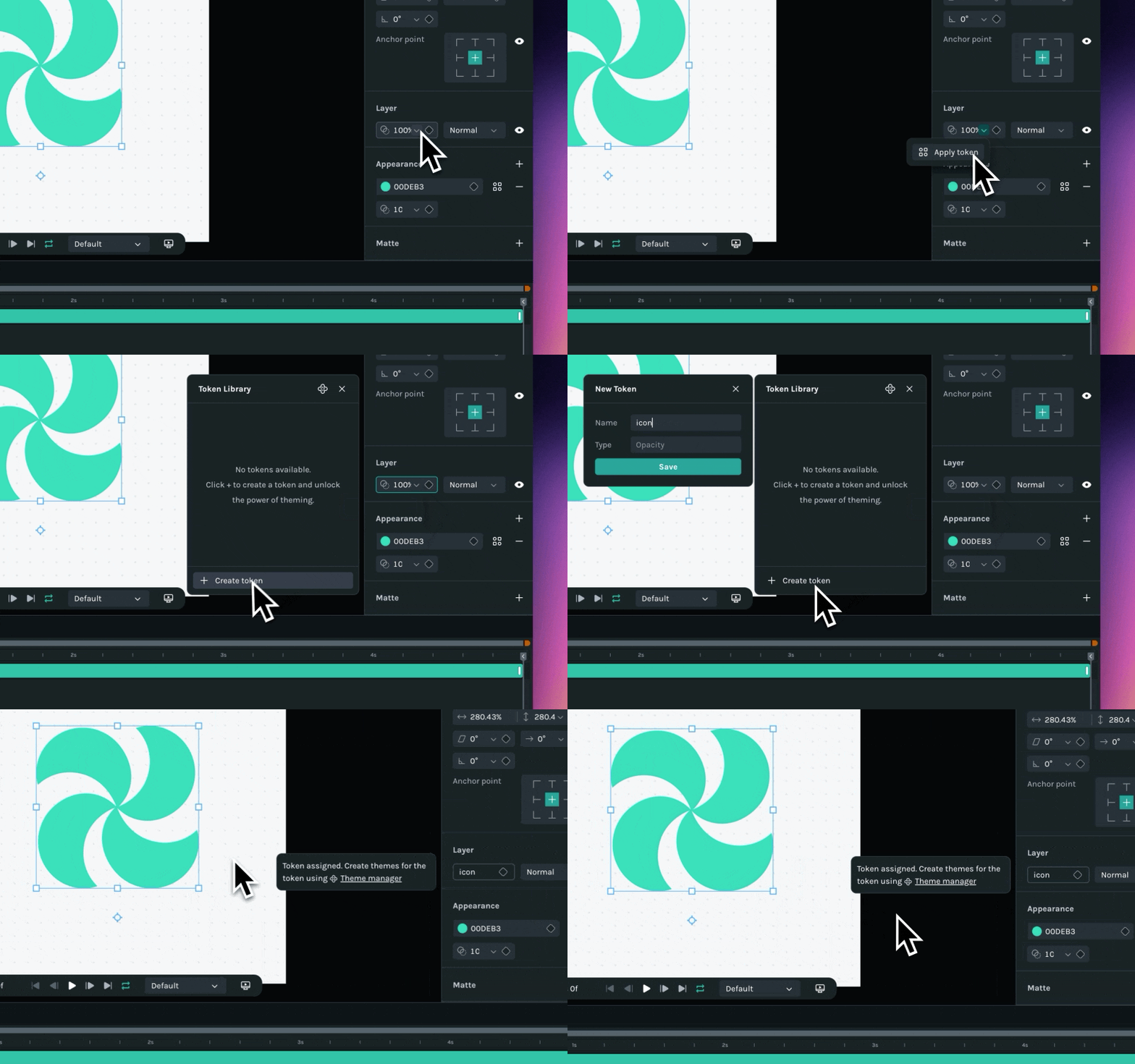
Give each token a descriptive name so you remember what it does later.
After tokens are created, they can be accessed via the Motion Tokens manager on the floating panel. From here, tokens can be edited and themes can be created.
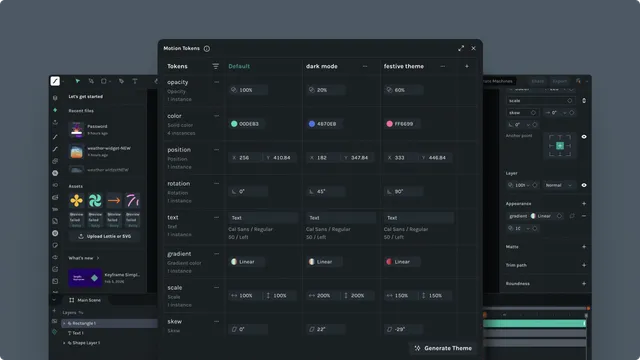
Note: Editing tokens in the Motion Tokens manager permanently alters the default values. This is different from how tokens are used later in your project, where editing them does not result in permanent change.
Themes
Themes are preset collections of token values. Define light, dark, and branded variants and select them at runtime — or switch between them via State Machines.
Switching themes in Creator
While working in Lottie Creator, you can switch between themes directly in the Motion Tokens manager to preview how your animation looks across variants. This lets you verify that all tokens resolve correctly before exporting.
Switching themes in Workspace
After exporting to your Workspace, you can switch themes there too. Token value changes in Workspace are non-destructive — they don't affect the source file. Use this to test every variant in the real playback environment before handing off to developers.
Once you are done animating, setting up tokens, and creating themes, export the animation to your Workspace.
In Your Workspace
Preview your animation exactly as it will appear in production. Update token values in real time to test every variant, without affecting the source file.
Updating token values here will not permanently alter your animation. You can undo any changes by reloading the page or clicking Reset all.

Next Steps
Motion Tokens are powerful on their own — they allow several layers to share properties that can be updated all at once or grouped in themes. Their real power is unlocked when combined with code.
- •
Ready to connect your tokens to real data? Start with the Slots API
- •
Want to prototype as a designer? See Motion Tokens in Code