Transitions
Transitions connect states and allow movement between them. Transitions contain guard conditions to prevent movement at the wrong time.
Transition settings
Transitions are shown as lines connecting exactly two states, from one state's exit node to its entry node. Clicking the transition line will open its settings menu.
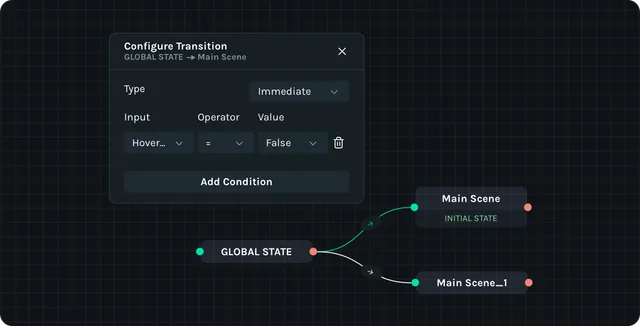
Each transition can be set to either immediate or tweened.
- •
Immediate — the transition happens right away, jumping from whatever the exit properties of the previous state were directly into the beginning properties of the next state.
- •
Tweened — the transition happens gradually, slowly transitioning the exit properties of the previous state into the beginning properties of the next state within a set amount of time.
Building transitions
In the state graph, drag from the source state to the target to create a link.
Select the link and add guards.
Choose Immediate or Tweened timing; set duration/easing for Tweened (0.2–0.3s works well for UI).
Best practices
- •Test rapid clicks/hover in Interactivity Mode to catch race conditions.