Publishing to Community
Publishing lets you share your animation publicly on LottieFiles so others can view, discover, and use your work.
Publishing vs exporting
- •Export Save an animation for personal or project use. Exported files remain private.
- •
Publish Share an animation publicly on LottieFiles. Published animations appear on your profile and in community discovery.
When to publish
Publish animations when you want to:
- •Showcase your work
- •Build a public portfolio
- •Share techniques or examples
- •Make an animation discoverable by others
How publishing works
You can start publishing directly from Lottie Creator.
Publish an animation
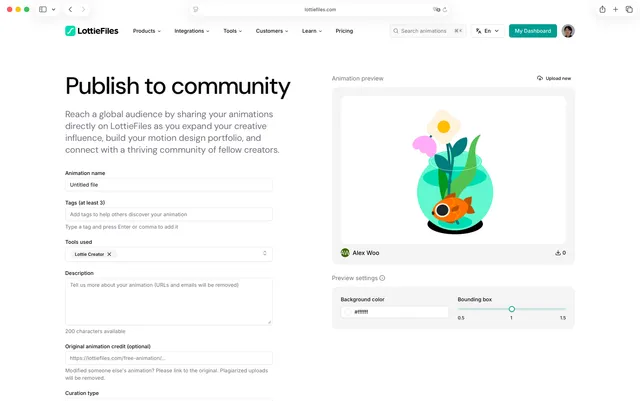
Finish your animation in Creator
Click Publish in the editor
Complete the publish dialog:
- •Title (required)
- •Description
- •Tags
- •License
Confirm publish
The animation uploads to LottieFiles and opens on its public page
Published animations are optimized for web viewing. Creator may automatically convert the file format during publishing.
Publishing requirements
Before publishing, make sure your animation:
- •Is complete and working as expected
- •Is original work or properly attributed
- •Follows LottieFiles community guidelines
- •Contains appropriate and non offensive content
Animation metadata
Metadata helps others understand and discover your animation.
Title
Use a clear and descriptive title that reflects the content of the animation.
Examples
- •Loading spinner minimal
- •Button hover animation
- •Hero section illustration
Description
Briefly explain what the animation does and how it can be used.
Example Smooth loading spinner designed for web and mobile interfaces. Includes multiple color variations.
Tags
Tags improve discoverability and categorization.
Guidelines
- •Use several relevant tags
- •Describe style, use case, and context
Examples
- •loading, button, ui
- •minimalist, flat, illustration
- •web, mobile
License
Choose a license during publishing. Available license options and terms are shown in the publish dialog and define how others may use your animation.
Managing published animations
After publishing, management happens on LottieFiles.
View published animations
To view your published work:
Sign in to LottieFiles
Open your profile or files page
Browse your published animations and engagement metrics
Update a published animation
Edits to published animations are managed on LottieFiles. Updating an animation may replace the existing version or create a new one depending on the workflow and settings.
Remove a published animation
You can remove or delete a published animation from LottieFiles using the web interface. This removes the animation from public view.
Community guidelines
Published animations should:
- •Be original or properly licensed
- •Be appropriate for all audiences
- •Avoid copyrighted or misleading content
- •Meet basic quality standards
Violations may result in removal from the community.