Render
Before you click Render, there are a few decisions that shape what your Lottie will look like — and how it will behave on the platforms you're targeting. This chapter is about those decisions: which preview renderer the plugin uses, which player library version you should target, and whether to ship .json (Lottie) or .lottie (dotLottie). None of this is mandatory reading for a casual export, but it's where production work usually goes wrong if skipped.
Animation preview — which renderer
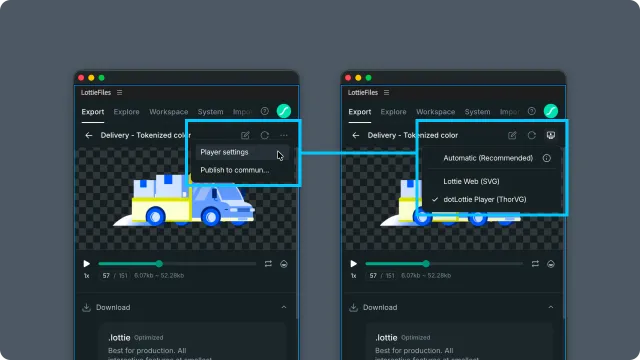
The plugin previews your animation before render. The preview is not necessarily the same engine your end users will see. Open the full preview's overflow menu and choose Player settings to select:
Automatic (Recommended) — uses the renderer recommended for the current animation.
Lottie Web (SVG) — the classic web renderer from the
lottie-webfamily.dotLottie Player (ThorVG) — the ThorVG renderer used by the official dotLottie player and required for previewing themes and State Machines correctly.
Player settings are available from full previews in Explore, Import, Workspace, and completed Export renders. When an animation contains themes or State Machines, the plugin warns before switching away from dotLottie Player.
Library version — what your end users have installed
Lottie has runtime libraries (lottie-web, lottie-react, dotlottie-web, lottie-android, lottie-ios, etc.) and each library has a version. A feature you author in After Effects today may require a runtime library version released last month. If your end user's site or app embeds an older version, that feature simply won't render.
Before exporting, check:
Which library your destination uses (most commonly a dotLottie runtime like
dotlottie-webor a legacy Lottie runtime likelottie-web).Which version that destination has installed. Older versions don't support newer Lottie spec features (expressions baking, advanced text animators, state machines, motion tokens).
Whether the destination team can update the library. If they can't, restrict yourself to features that the installed version supports.
The Feature checker inside the plugin will analyse a Lottie file and report which features it uses; cross-reference that with your runtime's release notes.
Choosing format — .json (Lottie) vs .lottie (dotLottie)
The plugin can produce two formats. They serve different deployment contexts.
.json (Lottie) | .lottie (dotLottie) | |
| What it is | Plain JSON, the original Lottie format | A zipped container around one or more Lottie JSONs with metadata |
| File size | Larger (uncompressed text) | Smaller (gzip-compressed, asset deduped) |
| Supports State Machines | ❌ | ✅ |
| Supports Themes and Motion Tokens | ❌ | ✅ |
| Runtime library | lottie-web, lottie-react, etc. | dotlottie-web, dotlottie-react, etc. |
| Backwards compatible | ✅ Widely supported across all runtimes | 🟡 Requires a dotLottie-aware runtime |
| When to choose | Maximum compatibility, you don't need themes or state machines | Smaller files, you're using themes or state machines, you control the runtime |
If your destination already uses lottie-web and the deploy team can't change runtimes, ship .json. If you're starting fresh or your destination supports .lottie, ship .lottie and benefit from smaller files plus optional theme/state-machine support.
Related
Preparing comps for Lottie — AE-side comp prep, before render thinking.
Export — running the actual render.
Feature checker — analyse a Lottie file's feature usage against runtime support.
Lottie compatibility — the static AE-feature → Lottie matrix.