Figma to Lottie controls
Reference the main controls used when animating and exporting a Figma scene with the LottieFiles plugin.
A reference for the main controls in the Figma to Lottie workflow.
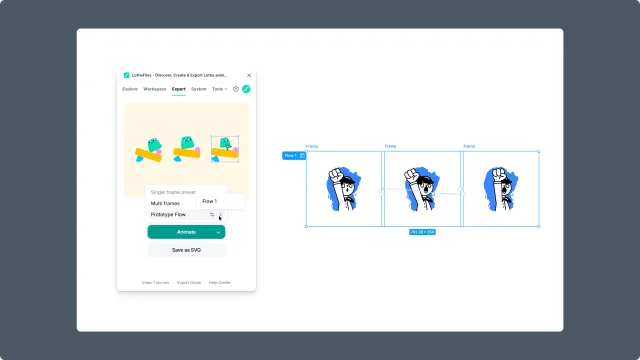
How to access this
Select a frame, multiple frames, or a prototype flow in Figma.
Open the LottieFiles plugin.
Click Animate.
Starting controls
Animate - starts Figma to Lottie from the current canvas selection.
Method selection - depends on whether the selection is a single frame, multiple frames, a prototype flow, or interactive prototype.
Preset selector - appears for preset-based animation.
Preview controls
Player preview - shows the generated animation before export.
Playback controls - play, pause, loop, or scrub when available.
Interactive preview - appears for state-machine behavior when supported.
Export controls
Output format - choose Lottie JSON, dotLottie, GIF, MP4, WebM, or MOV where available.
Save to Workspace - stores the result in your LottieFiles workspace.
Download - downloads a local file.
Insert as GIF - places an animated GIF back into the Figma canvas when available.
Warning state
An orange warning during render or export means the selected Figma scene includes unsupported or risky features. Read the warning before retrying. See Feature checking.