Using Motion System primitives
Search a Motion System and copy, insert, or download its implementation-ready primitives.
Use a Motion System primitive when the implementation should match the team's approved motion language rather than recreate a value by eye.
Find a primitive
Open Workspace and choose the correct workspace.
Open System.
Choose a system when more than one is available.
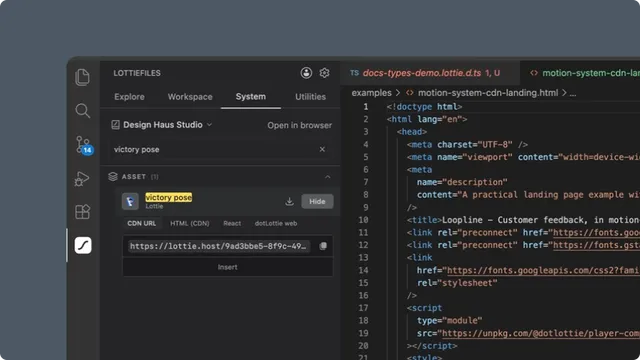
Search by primitive name or value.
Expand the relevant section.
Search matches are highlighted, and section counts update to the visible results.
Choose Copy, Insert, or Download
Copy puts the selected value or snippet on the clipboard.
Insert writes it at every active editor cursor or replaces the current selections.
Download saves an eligible collection asset or uploaded font into a folder you choose.
Open a file and place the cursor before using Insert. If no text editor is active, the extension asks you to open one.
Colors
Solid colors include Hex, RGB, CSS variable, CSS usage, TypeScript, React inline, and Tailwind configuration formats. Gradients include CSS value, variable, usage, TypeScript, React, and Tailwind background-image formats.
Click a solid hex value for a quick copy. Gradient rows show their type and color count; hover the count to inspect stops and offsets.
Easing curves
Choose among:
Raw
cubic-bezier(...).CSS variable.
CSS transition.
CSS animation timing.
TypeScript tuple.
The curve thumbnail and raw value make it easier to compare similar named easings before insertion.
Fonts
Font rows preview the actual typeface when its source is available. Formats include CSS usage, CSS variable, @font-face, TypeScript, and a Google Fonts link for Google-hosted fonts.
An uploaded font with a real source URL also has a download action. Choose the destination folder when prompted.
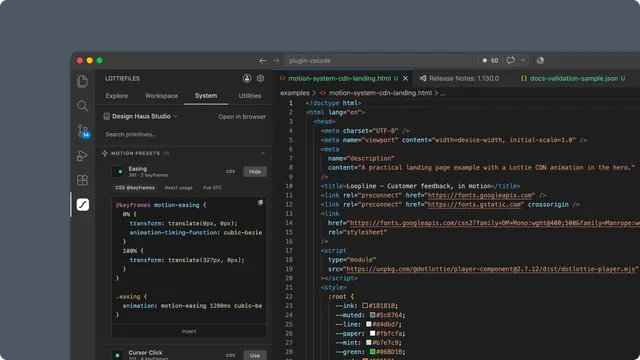
Motion presets
Presets show a live preview and a CSS or Lottie badge.
CSS-compatible position, scale, rotation, or opacity motion can produce CSS
@keyframes, React usage, and Vue SFC output.Trim-path, stroke, or other non-CSS motion exposes reference keyframe data and guidance to use it as Lottie or dotLottie.
The current System tab does not download a generated Lottie for a non-CSS preset.
Collection assets
Click a collection thumbnail to open a larger preview. Lottie assets play live; supported static assets use an image preview.
Lottie formats include:
CDN URL.
HTML with the dotLottie web component.
React with
DotLottieReact.dotLottie-webTypeScript.
Image formats include the asset URL, HTML image tag, CSS background, and React image output. Download saves the original linked file into a selected folder.
The System tab exposes the URL already stored on the asset. It does not enable or manage Workspace CDN publication.
Open in browser
Use Open in browser to review system documentation, manage primitives, or work with drafts and publication in LottieFiles Workflow.