Workspace
Workspace is where the LottieFiles plugin earns its keep as a collaboration tool. Stay in After Effects, where your compositions live, and still share an animation URL with a teammate, push a new version over the same URL, and signal where the file stands — in progress, needs review, approved, shipped. Your team can be in Figma, the browser, or Slack; the same animation file is the meeting point. Set up this workflow once and keep using it for the lifetime of a project.
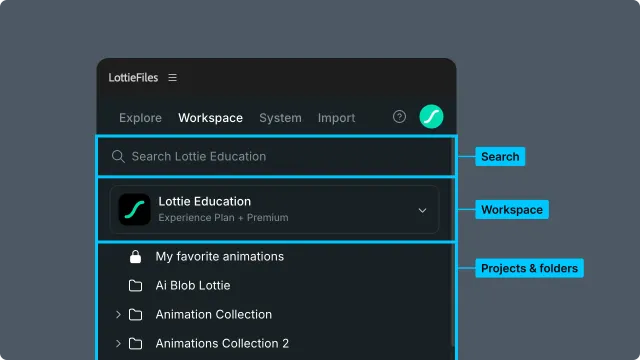
What Workspace lets you do without leaving AE
Share an animation — turn any workspace file into a public URL anyone can open in a browser. No LottieFiles account required on the recipient's side. See Sharing an animation.
Update a version — push new renders to an existing workspace file from AE. The share URL stays the same; the animation behind it gets fresher. See Updating a version.
Track file status — move a file through No status → In progress → Needs review → Approved → Shipped. Teammates watching the link see status change without any extra messaging. See Tracking file status.
Customize Motion Tokens and themes — preview and edit tokenized dotLottie values, then save the result back to Workspace as a new version. See Managing themes and changes.
Reuse AEP source files — insert an AEP into the open After Effects project or open it as a separate project.
Sharing, versioning, and status combine into the collaboration loop: enable the link once, push updates from AE as you iterate, and bump status when a reviewer needs to look. Motion Tokens and source-file insertion let the same Workspace library support hands-on production work as well.
In this chapter
Sharing an animation — generate a public link and use it as a stable review URL.
Updating a version — push new renders to an existing workspace file so the share URL stays fresh.
Tracking file status — five statuses to coordinate review across teammates.
Browsing and searching — navigate the hierarchy and find files.
Workspace panel controls — insert AEP source files and reference the rest of the UI.
Related
Export — how files arrive in the workspace in the first place.
Managing Motion Token themes and changes — edit token values and save themes from Workspace.
Motion System — design elements that ride along inside shared workspace files.