Workspace panel controls
A reference for every control across the Workspace tab's views.
How to access this
Open the LottieFiles plugin in After Effects.
Click Workspace in the top tab bar.
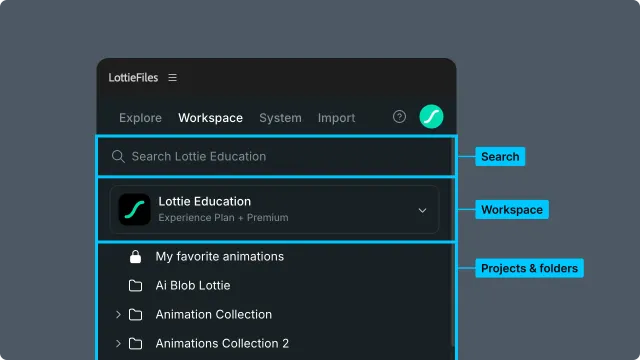
Top header (all views)
Workspace selector — choose between workspaces you have access to. Currently active workspace name displayed.
Search bar — workspace-wide search. See Browsing and searching.
Breadcrumbs — only shown when you've drilled into a project or folder. Click any segment to jump back to that level.
Workspace landing view
Project grid — every project in the active workspace.
Project card — name, last-modified date, file/folder count.
Project view
Folder cards — folders at the project root.
File cards — animations, images, and source files at the project root, not in a folder.
Sort / view options (when present) — grid layout, sort by date or name.
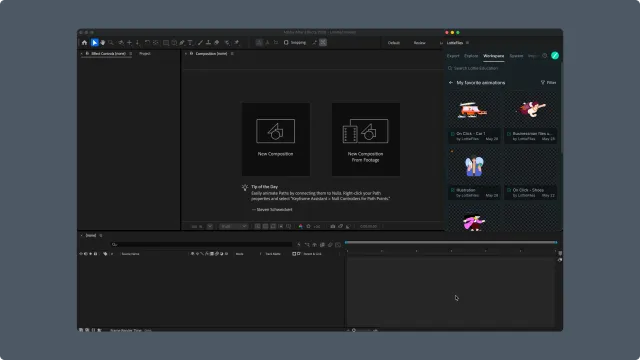
Folder view
Same structure as Project view, one hierarchy level down. Folders can be nested up to 6 levels.
Search results view
Mixed grid — files and folders matching the query, intermixed.
No project results — the current scope excludes projects.
Empty state — message when no matches.
Animation file detail view
The most action-dense view. The header, sidebar actions, and content sections all collaborate to make this the file's home for the entire team.
Header (file-specific)
Breadcrumb — path from workspace to the file.
Status dot — five values (No status, In progress, Needs review, Approved, Shipped). Click to change. See Tracking file status. Plan-gated.
Share button — toggle public access and copy the share URL. See Sharing an animation.
Test on mobile — generates a mobile preview link or QR. (Feature pending verification; may not be present in all builds.)
Main file detail sections
Player — playback with loop control. Hover the preview to reveal minus and plus zoom controls from 10% to 300%; drag the resize handle when available.
Pan when zoomed — above 100%, drag the preview or use a two-finger trackpad gesture to move the enlarged animation within the preview boundaries. Preview clicks do not trigger playback or State Machine interactions at this zoom level. At 100% or below, the existing preview interactions remain available.
Background color — backdrop options.
Insert to AE — inserts the animation into the After Effects project with the currently previewed token and theme values.
Open in Creator — opens the file in LottieFiles Creator (web).
Download accordion — four-variant download (
.lottie/.JSON× optimized). See Download.Feature checker accordion — Lottie feature breakdown. See Feature checker.
State Machines (if present) — listed for reference.
Motion Tokens (if present) — choose Default or a named theme, then edit color, gradient, scalar, vector, text, and keyframed token values with live preview.
Render graph (if present) — bandwidth and size analysis. (Feature pending verification.)
For the complete token editing, theme management, and saving workflow, see Managing themes and changes.
AEP source file detail view
An AEP source file uses After Effects' native project handling rather than the Lottie animation importer:
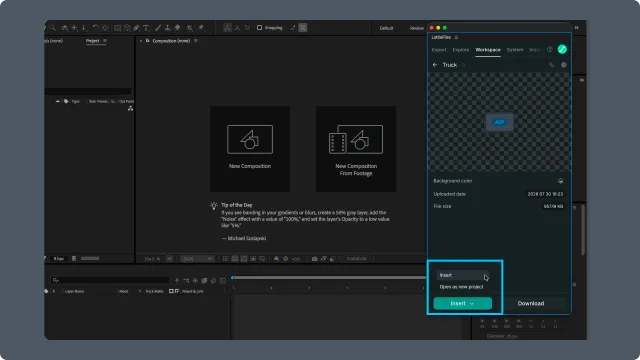
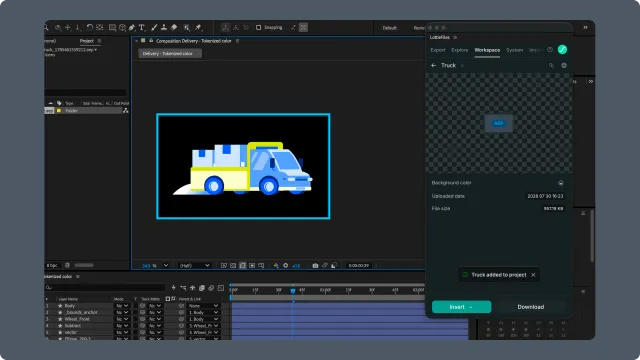
Insert — merges the AEP into the currently open After Effects project and opens its main composition.
Open as new project — opens a native save dialog, saves the AEP locally, and opens it as a separate After Effects project.
Download — downloads the source file without opening it in After Effects.
Open the select menu beside Insert to choose between Insert and Open as new project. Download remains available as the secondary action.
Footer (file-specific)
Update from AE — replace the current file's animation with a render of an AE composition. The file ID and share URL stay the same; the animation changes. See Updating a version. Plan-gated; locked button shows an icon when unavailable.
Drag interactions
Drag a supported animation file card onto AE — imports the animation as a new layer in the active composition. Open an AEP source file and use its Insert menu instead.
Drag-and-drop reorder of files/folders — not currently supported in the plugin UI. Use the LottieFiles web app to reorganize.
Related
Browsing and searching — using these controls in a navigation workflow.
Sharing an animation — the share button workflow.
Updating a version — the Update from AE workflow.
Tracking file status — the status dot workflow.
Managing Motion Token themes and changes — edit token values and save themes.