Interface
Learn the main areas of the LottieFiles plugin for Figma, including Explore, Workspace, Export, System, and Tools.
The LottieFiles plugin is organized around the motion tasks designers usually do inside Figma: find an existing animation, manage workspace assets, create a new animation from a Figma scene, or prepare artwork with tools.
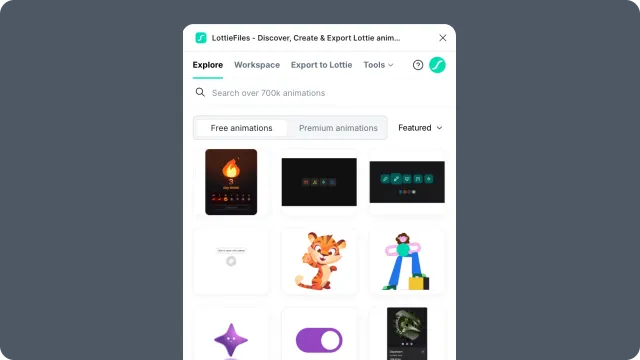
Main areas
Explore - browse the public LottieFiles library and insert animations into the current Figma scene. See Explore.
Workspace - browse private or team assets saved to your LottieFiles workspace. See Workspace.
Export - animate selected Figma content and export it as Lottie JSON, dotLottie, GIF, MP4, WebM, or MOV output. See Figma to Lottie.
System - Motion System tokens and reusable motion styles. See Motion System.
Tools - access artwork-preparation features such as Prompt to Vector and Vectorizer.
Account controls
Use the account area to sign in, switch account context, or access plugin-level help. Workspace, saving, sharing, Premium animations, and plan-gated features depend on your signed-in LottieFiles account.
Canvas selection and plugin actions
Most Figma to Lottie actions depend on what is selected in the Figma canvas:
A single frame can use preset animation.
Multiple frames can become a sequence.
A prototype flow starting point can become a flow-based animation.
A prototype with supported interaction triggers can become an interactive dotLottie state machine.
If the plugin chooses a different workflow than expected, check the canvas selection first. A frame that is also a prototype flow starting point can route into Prototype Flow mode instead of Preset mode.