Generating interaction snippets
Generate scroll, viewport, hover, click, or state-machine patterns from the Utilities tab.
Utilities Snippets provides reusable interaction patterns that go beyond basic autoplay and loop configuration.
Open Snippets
Open Utilities.
Select Snippets.
Choose a pattern.
Choose a framework.
Copy the package install command and generated code.
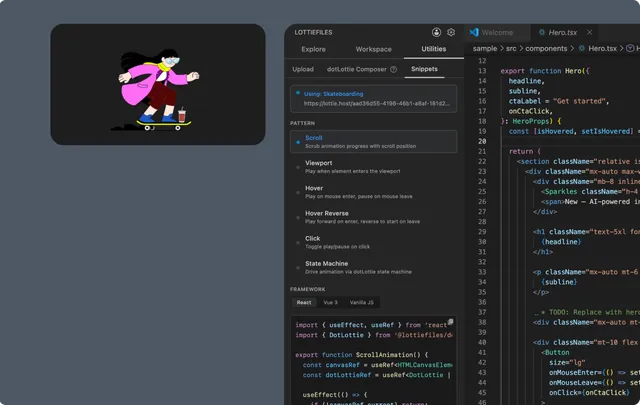
Available patterns
| Pattern | Behavior |
| Scroll | Scrub animation progress with page scroll |
| Viewport | Play when the player enters the viewport |
| Hover | Play on pointer enter and pause on leave |
| Hover Reverse | Play forward on enter and reverse to the start on leave |
| Click | Toggle playback from a click |
| State Machine | Drive a dotLottie state machine from application logic |
Supported frameworks
Utilities interaction snippets support:
React with
@lottiefiles/dotlottie-react.Vue 3 with
@lottiefiles/dotlottie-vue.Vanilla JavaScript with
@lottiefiles/dotlottie-web.
Angular and Svelte are available in basic integration code but not in the current interaction-pattern list.
Provide an animation source
Utilities automatically uses the last CDN-enabled Workspace file when one is available. Otherwise it generates a placeholder source.
If the workspace disables CDN links, replace the placeholder with a downloaded project path or another durable URL. Never leave the placeholder in production code.
Adapt the pattern
Generated code is a starting point. Review and adapt:
The target element or selector.
Scroll range and frame mapping.
Intersection threshold.
Pointer and keyboard accessibility.
Cleanup of event listeners and player instances.
State-machine IDs, inputs, and event payloads.
Verify
Test the interaction in the target browser and at reduced-motion settings. A motion pattern should not block the underlying UI action or make content inaccessible.