Tracking file status
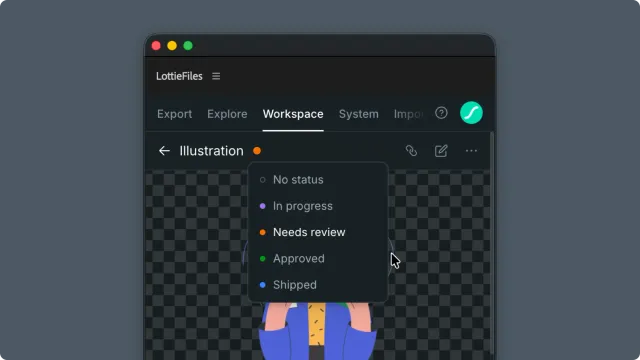
Every workspace file has a status dot next to its name. Five values cover a typical motion review cycle. The dot is visible to anyone with workspace access, including teammates browsing in the LottieFiles web app. Change status the same way you change a sticky note color — one click in the plugin header, no comments required.
How to access this
Open the LottieFiles plugin in After Effects.
Click Workspace in the top tab bar.
Navigate to a file's detail view.
Click the status dot next to the file's breadcrumb to open the status menu.
The five statuses
| Label | Dot color | When to set |
| No status | gray outline | New file, not yet in a review flow. Default for fresh uploads. |
| In progress | purple | Actively iterating; not asking for review yet. |
| Needs review | orange | Anyone tracking the share link should look. |
| Approved | green | Reviewers signed off; ready to ship but not yet released. |
| Shipped | blue | Animation is live in a production product or release. |
The status dot is visible:
In the plugin's Workspace browse views (folder grids, search results).
In the LottieFiles web app for the same workspace.
Anywhere a workspace file is referenced in the LottieFiles platform.
Change status from the plugin
Open the file in the Workspace tab.
Click the status dot next to the file's name in the header.
Pick a new status from the dropdown.
The change saves immediately — no Confirm step.
Tips for motion/product designers
Use Needs review as your only "ping me" trigger. Agree with the team that any file in Needs review is waiting on someone specific. Don't leave files in Needs review long-term — once reviewers respond, move it.
Shipped means live in production. Reserve Approved for "ready to ship but not yet released" — keeps the signal clean for teammates triaging what's actually out the door.
Pair status with concise comments on the share link when reviewers need context ("v2 — fixed the bounce timing"). Status says "look now"; the comment says "look for what".
Troubleshooting
Status dropdown is greyed out / shows upgrade prompt — workspace plan doesn't include status changes. See plan gating above.
Status appears different in plugin vs LottieFiles web — refresh both surfaces. The change is server-side; both eventually reflect, but caching delays can show briefly different states.
No one notices status changes — status is a passive signal. Pair with active outreach (Slack message, Linear comment) for time-sensitive items.
Related
Updating a version — the change that usually triggers a status bump.
Sharing an animation — the surface where status becomes visible to outsiders.