Explore panel controls
A reference for every control on the Explore tab and its preview view.
How to access this
Open the LottieFiles plugin in After Effects.
Click Explore in the top tab bar.
Header
Search bar — Filters animations in the active tab. Clear icon resets the query and pagination.
Free / Premium tabs — switches the browse scope. Query persists across switches.
Animation grid
Each card represents one animation.
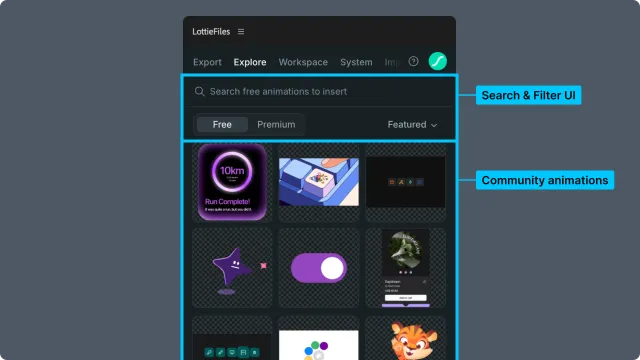
Thumbnail — static preview; hover to play.
Creator name (when shown) — links to the creator's profile.
Premium badge (Premium-only) — marks paid content.
Cards are arranged in a responsive grid. Scroll loads the next page automatically (infinite scroll).
Featured strip (Free tab only)
A horizontal carousel of curated Featured animations at the top of the page. Featured rotates periodically and is the same content as the public-facing Featured collection on lottiefiles.com.
Premium preview bar (Premium tab only)
A horizontal strip near the search bar showing search-result thumbnails for the current query. Mirrors the search results in Premium tab, optimized for quick visual scanning.
Full preview view
Clicking a card opens the preview overlay.
Player — full-sized animation playback with looping.
Playback controls — play/pause; some animations show scrubber.
Zoom controls — hover the preview to reveal minus and plus buttons. Zoom ranges from 10% to 300% in 10% steps.
Pan when zoomed — above 100%, the cursor changes to grab. Drag the preview or use a two-finger trackpad gesture to move the enlarged animation within the preview boundaries. Preview clicks are reserved for panning at this zoom level and do not trigger playback or State Machine interactions. At 100% or below, the existing preview interactions remain available.
Resize handle — drag to change the preview height when the handle is available.
Motion Tokens (when available) — for dotLottie animations that include Motion Tokens or themes, expand the accordion to choose Default or a named theme and edit token values with live preview. See Using Motion Tokens.
Insert button — inserts the animation as a new composition in the After Effects project.
License info (Premium) — the license terms applicable to this animation.
Back / Close — returns to the grid view.
Bottom bar
The plugin's global bottom bar appears in Explore when uploads or other operations are in progress. Not Explore-specific — see the chapter for whichever operation is showing.
Related
Finding animations — using these controls in the search workflow.
Previewing and importing — using the full preview view.