VS Code
Find, inspect, and integrate Lottie animations without leaving a VS Code-based IDE.
The LottieFiles extension brings animation discovery, inspection, and delivery into Visual Studio Code, Cursor, and Windsurf. Preview local files, use team assets, test advanced dotLottie features, and generate implementation code without returning to a designer's canvas.
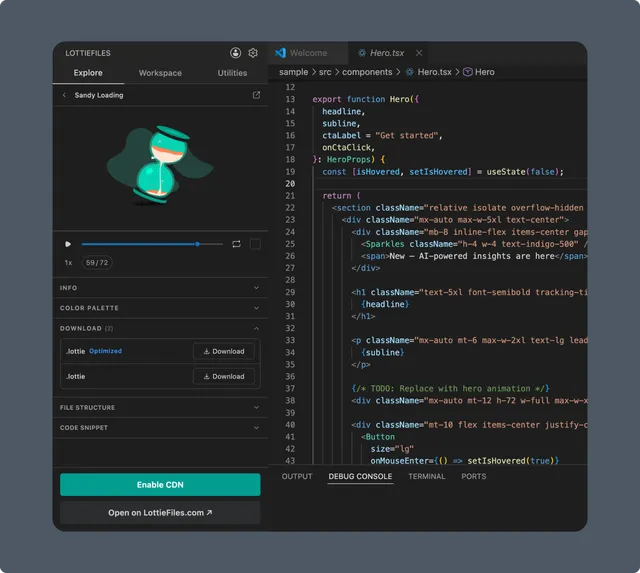
Core workflow
Find an animation in Explore, Workspace, or your team's Motion System.
Inspect playback, multi-animation contents, themes, motion tokens, or state machines.
Integrate by downloading the right format, publishing a Workspace URL, or generating code.
Follow the Quickstart for the fastest complete workflow.
Choose a starting point
| Starting point | Use it when | Next step |
| Explore | You need to discover a public animation | Explore |
| Workspace | Your team already saved or approved the asset | Workspace |
| Local file | A .json or .lottie file is already in the project | Previewing local Lottie files |
| System | You need an approved color, easing, font, preset, or collection asset | Motion System |
Developer tools
Preview and validate Lottie JSON while editing.
Inspect animation IDs, markers, segments, themes, motion tokens, and state machines.
Download original or optimized
.lottie, Lottie JSON, or Animated SVG (SMIL).Publish Workspace assets with permanent CDN links.
Generate player and interaction code.
Create multi-animation dotLottie bundles.
Generate TypeScript identifiers and CI validation files.
Supported IDEs
The extension supports Visual Studio Code, Cursor, and Windsurf. Some first-run and walkthrough behavior differs between IDEs. See IDE compatibility and troubleshooting.