Downloading files
Download Lottie JSON, dotLottie, GIF, MP4, WebM, or MOV output from the LottieFiles plugin for Figma.
Download a local file when you need to attach an animation to another tool, test it locally, or send a file directly.
Steps
Generate and preview the animation.
Choose the output format.
Click the download action when available.
Save the file locally.
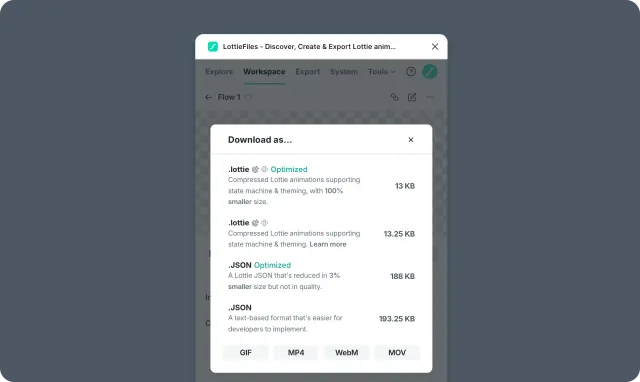
What to download
Download
.lottieby default — smaller files and access to state machines, themes, and motion tokens.Download
.jsonwhen you need compatibility with legacylottie-webstyle players.Download GIF, MP4, WebM, or MOV for review or design-context use.
Before sending a file
Confirm the recipient knows:
Which format you exported.
Whether the animation is interactive.
Which runtime should play it.
Whether Workspace has a newer version.
Related
Last updated: October 8, 2026 at 10:45 AMEdit this page