Plugin controls
Reference the main controls in the LottieFiles plugin for Framer.
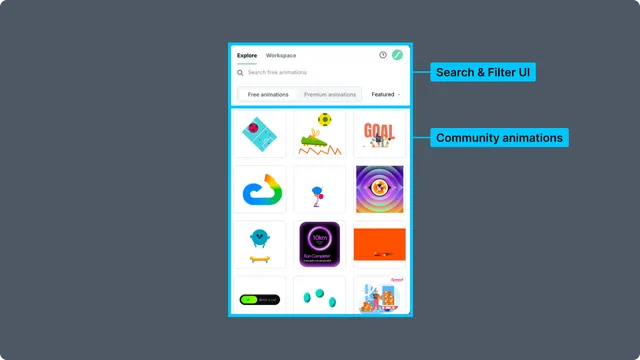
Navigation
| Control | Purpose |
| Explore | Browse free and Premium public animations |
| Workspace | Browse private and team workspaces, projects, folders, and files |
| Help | Open support, bug reporting, and feature-request resources |
| Account | Sign in, inspect the active account, or sign out |
Explore
| Control | Purpose |
| Search | Find public animations by keyword |
| Free animations | Browse community animations available without Premium access |
| Premium animations | Browse plan-dependent Premium results |
| Featured, Popular, Recent | Change the result source or sort context |
Preview and preparation
| Control | Purpose |
| Play, pause, seeker | Inspect ordinary timeline playback |
| Loop | Repeat or stop after one timeline pass |
| Speed | Preview supported playback speeds |
| Background | Test transparent or colored backgrounds |
| Player settings | Choose Automatic, SVG Player, or ThorVG Player |
| Palette | Recolor supported artwork |
| Theme | Select the active dotLottie theme |
| Configure themes | Map file themes to Framer light and dark modes |
| State machine | Enable and test an available state machine |
| Insert animation | Add the prepared player component to the Framer canvas |
Contextual component view
Select an inserted LottieFiles player component to reopen its animation settings. The plugin returns to Explore or Workspace when the component is deselected.
Related
Last updated: October 8, 2026 at 10:45 AMEdit this page