Uploading and organizing assets
Upload supported files to a Workspace project or folder and manage their location from VS Code.
Upload project assets from Workspace when they should be stored, shared, versioned, or published through LottieFiles.
Choose a destination
Open Workspace.
Select the destination workspace.
Open a project and, when needed, a nested folder.
Open the plus menu.
Choose Upload Animation.
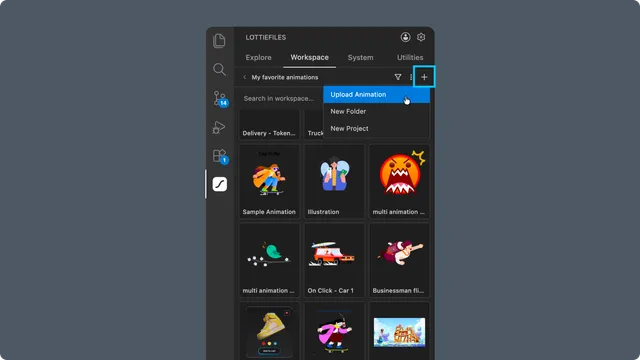
The current label says Upload Animation, but the system file picker accepts several DAM categories.
Supported upload groups
| Group | Examples |
| Animations | .lottie, .lot, Lottie .json, .tgs |
| Creator files | .creator, .creator.gz |
| Images | .png, .jpg, .jpeg, .gif, .webp, .svg |
| Design sources | .aep, .ai, .psd |
| Video or sequences | .mp4, .webm, .mov, QuickTime, PNG-sequence .zip |
Animation, Creator, image, and design files are uploaded to the selected Workspace location. Video and sequence inputs use an asynchronous conversion flow and can take longer to appear.
Organize the workspace
Use the plus menu to create projects or folders when your plan permits it. Item menus can rename or delete supported files, folders, and projects.
Creating projects and folders can be plan-gated. Upload size limits also differ by file group, so follow the validation message shown by the extension.
Verify the upload
After completion, reopen the project or folder and select the new asset. Confirm its name, type, preview, and destination before sharing it or publishing it with CDN.
Utilities Upload is different
Utilities -> Upload opens a local .json or .lottie for preview during the current session. It does not save the file to Workspace. See Previewing local Lottie files.
Troubleshooting
Unsupported file type - choose a listed format or convert it before upload.
Invalid Lottie JSON - confirm that the JSON contains a Lottie animation, not general application data.
A
.gzfile is rejected - only.creator.gzis accepted as a Creator file.New Project or New Folder is locked - the active plan may not include container creation.