Feature checker
The plugin's Feature checker analyses a Lottie file and reports which Lottie features it uses, alongside compatibility data for each. It's an interactive tool, not a static list — drop a Lottie in, get its feature inventory back.
The checker is powered by @lottiefiles/can-i-relottie, the same library that runs the public compatibility browser at lottie.canilottie.com.
Where the checker appears
The checker surfaces in the file view inside Workspace — when you open a Lottie file, the plugin runs the checker over its JSON and shows the result alongside the Download section.
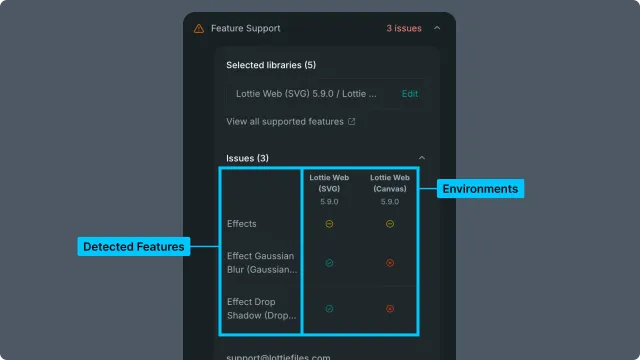
Reading the checker's report
The report lists, for each detected Lottie feature in the file:
The feature's name (e.g., "Repeater", "Trim Paths", "Text on a Path")
Which Lottie spec version introduced it
Compatibility flags for major runtimes (lottie-web, dotlottie-web, lottie-android, lottie-ios, Skottie, etc.)
If a feature is incompatible with a runtime your target uses, the report flags it. This is the in-plugin equivalent of cross-referencing the Lottie compatibility matrix against your runtime — but automated, file-specific, and always current.
When to use the checker
Before sharing a Lottie with a teammate who'll embed it in a runtime you don't control.
After importing an unfamiliar
.lottieor.jsonfrom outside — to know what you've got before relying on it.When debugging a Lottie that plays differently in two environments — the checker often surfaces the exact feature responsible.
Related
Lottie compatibility — the underlying static matrix the checker reports against.
Render — runtime library version considerations.
Download — get the file out of workspace.