Motion tokens
Create and reuse runtime-controllable motion tokens directly in the Figma plugin, then export as dotLottie.
Motion tokens let you control animation properties — text, colors, transforms, gradients, and more — from code at runtime. They are a dotLottie feature, so they only survive when you export your Figma work as .lottie.
You create motion tokens directly in the LottieFiles plugin. Open the Motion Tokens panel to tokenize layer properties before you export, and the values resolve at runtime in the final product.
Why this matters for Figma exports
Motion tokens are dotLottie-only. Exporting as Lottie JSON removes them along with state machines and themes.
One exported file can drive many variations — light and dark themes, branded palettes, or data-driven values — without re-exporting from Figma.
Developers connect tokenized properties to live data through the dotLottie Slots API.
The Motion Tokens panel
Open the Motion Tokens panel in the plugin to see every layer in your animation, each with a list of its properties.
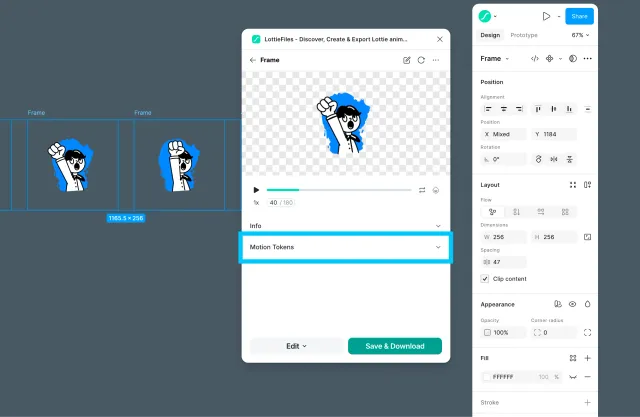
From here you can:
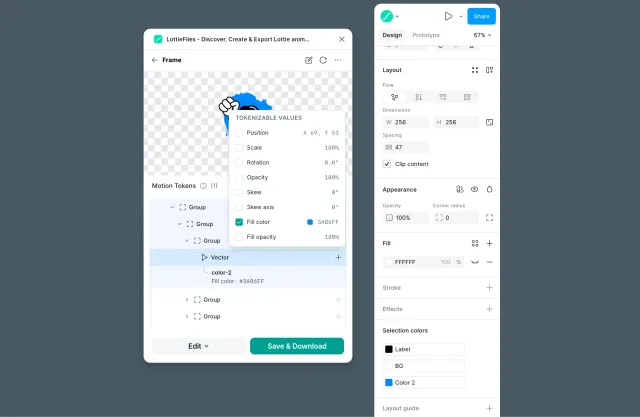
Create a token by checking the box next to a property.
Rename a token to something descriptive so you remember what it controls later.
Reuse an existing token on another layer — but only when that layer's property value matches the token's value exactly.
The exact-match requirement keeps bindings predictable: a token always represents one value, so reusing it across layers updates them together at runtime.
Workflow
Convert your Figma scene to motion output with the LottieFiles plugin.
Open the Motion Tokens panel and find the layer you want to control.
Check the box next to a property — such as text, color, position, scale, rotation, or opacity — to create a token, then rename it.
Reuse a previously bound token on other layers whose values match it exactly.
Export as dotLottie (
.lottie) to preserve the tokens.
Editing tokens when inserting
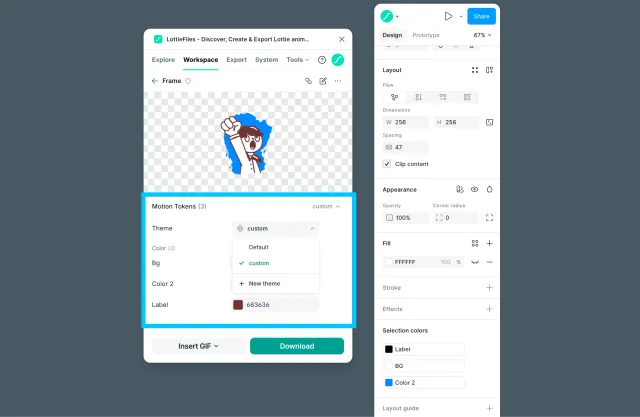
The same motion token controls appear in the insert flow when you preview an animation from Explore or Workspace that includes tokens.
Open an animation's preview from Explore or Workspace.
If the animation has motion tokens, the Motion Tokens panel is available in the preview.
View the token list and edit values to match your Figma scene — for example, brand colors or label text.
Save the current values as a new theme if you want to keep a preset variant.
Insert the animation into the canvas. The plugin places it with your edited token values applied.
Use this when you want the inserted animation to reflect a specific theme or customized token values before it lands on the canvas.
Important format rule
Motion tokens are stored in dotLottie. If you export the same work as Lottie JSON, tokens are removed along with state machines and themes. Always export as dotLottie (.lottie) when you need motion tokens.
Handoff note
Tell developers that motion tokens require a dotLottie runtime and are wired to live data through the Slots API. A plain Lottie runtime cannot read tokens.