Download
After a render finishes — or when you open a Lottie file in your workspace — the plugin offers four download variants. This chapter covers what each variant is, when to pick which, and where the Download UI surfaces.
Where Download appears
After a local render — the render queue surfaces a Download section per rendered composition.
In a workspace file view — opening any Lottie file inside the Workspace tab shows a Download accordion.
Both surfaces share the same 4-variant model below.
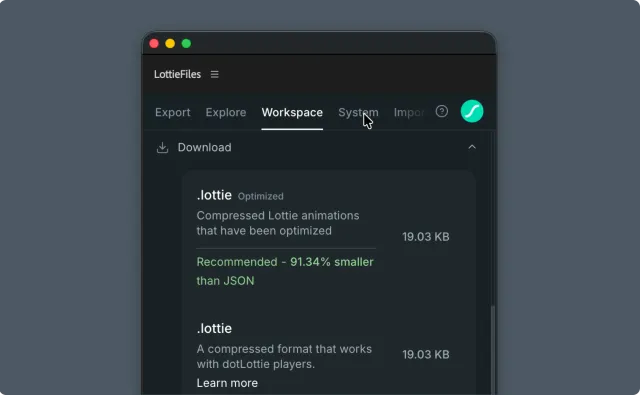
Download formats
The plugin downloads your animation in one of two formats.
| Variant | Format | Typical size | When to use |
.lottie | dotLottie | Up to ~80% smaller than .json | Default for production. Smallest file; supports State Machines + Themes. |
.JSON | Lottie JSON | Baseline — plain, uncompressed text | For runtimes that can only load plain Lottie JSON. |
Optimization
The plugin can download each format optimized or standard. Optimization runs the rendered Lottie through LottieFiles' own optimization pipeline to shrink the file on disk and over the network without changing playback. Optimized and standard files play identically in supporting runtimes; the difference is purely in file size.
If you see playback differences between optimized and standard output, that's a bug worth reporting. Whether you can download the Optimized .lottie variant depends on your plan — see the note below.
Related
Render — decide which format to render before you reach Download.
Feature checker — validate the downloaded file's feature usage.
Limits and plans
The standard .json and .lottie downloads are available on every plan. The Optimized .lottie variant (typically 30-60% smaller) requires a paid LottieFiles plan. See How plans affect the plugin.