Explore
Search, preview, customize, and use public LottieFiles animations from the editor.
Explore is the fastest source when the project does not already have an approved animation.
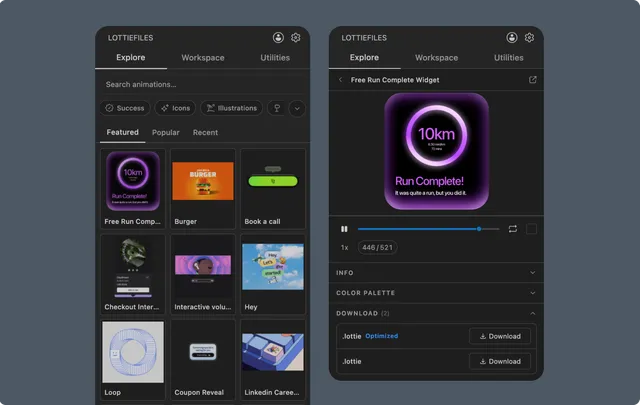
Browse and search
Open Explore, browse the visible collections, or search for a product state, object, or motion intent. Select a result to open the preview drawer.
Free and Premium content can appear together. Premium access depends on the connected account and plan.
Evaluate the animation
Use playback and file information to check:
Duration and frame count.
Dimensions and visual weight.
Whether the source is
.lottieor Lottie JSON.Embedded multi-animation, theme, token, or state-machine features.
Available original and optimized outputs.
Customize or save
Use the color palette for a quick visual change. Save the result to Workspace when the team needs to reuse, version, or publish it.
Choose the next action
Notes
Generated snippets should use a downloaded project file or permanent CDN URL. Preview and upload URLs can expire and should not be committed to production code.